How it Works
The add-on installer allows you to install a certain add-on (further referred to as consumer) directly from Lime Admin! To achieve this, limepkg-addon-installer has to be added as a dependency to the consumer and implemented according to the installation instructions. As a result of that, a new submenu called Setup will be added to the consumer's config in Lime Admin, which will be the starting point for the installation.
Database Structure
The add-on installer can install the database structure (tables and fields) required by the consumer.
The installation of the database structure is based on LIP's stored procedures. The stored procedures have been copied into the add-on installer repository and are called from Python. Hence, they are under version control and they are no longer required in the database for the add-on installer. However, LIP will still need them.
The current implementation of the add-on installer also requires that the consumer's database structure has the same format as LIP's lip.json file.
View configuration
The add-on installer can install view configuration. The add-on installer can only install view configuration for new tables, it can not modify an existing view configuration.
Security
The add-on installer can install the security information (users and groups) required by the consumer.
The installation of users and groups is done through lime-core.
Settings and config-importer configs
The add-on installer can install two kinds of configuration.
settings_configsinstall plugin settings configs through the owning package's lime-admin config plugin. Each config id must be the owning package's module name (which is also itsRuntimeConfigplugin name): the plugin is resolved by importing that package and calling itsregister_config()hook, so a package must expose that hook for its settings config to be installable. If the package is not installed, or it exposes noregister_config()hook, the item fails with a dependency-missing error. Existing configs are updated and the analysis flags unchanged ones as already up to date. Each config is migrated to the plugin's latest version via lime-config-importer's migration walk before it is stored.config_importer_configsinstall config-importer configs in batches. Each config is analyzed before installing, so the report shows how many entries will be added, updated, or left unchanged.
Automations and sequences
These are grouped under system configurations.
- Automations: An automation the installer created on a previous run is matched
through a stored mapping from its
id; otherwise — on the first install, or for automations created by hand — it is matched by itstitle. A match is updated, and anything unmatched is created as a new automation. - Sequences are add-only. A sequence whose name does not yet exist is created, and a sequence that already exists is left untouched. The add-on installer never updates or resets an existing sequence, so it can't disturb a running numbering series.
Manual steps
Some things can't be automated. The manual_steps field lets the consumer ship
a markdown document describing what the user has to do by hand after the
automatic installation finishes. It is shown in the installation report as its
own item so the user does not miss it.
Generated passwords and API keys
A user created with display_password=True gets a generated password, and an
API user gets a generated API key. They are listed under Credentials on the
page after the installation report, together with the manual steps, where each
one can be copied. They are only shown then and cannot be retrieved later.
Installer Config
The installer config is a powerful tool which allows the consumer to dynamically adjust the installation data based on user input.
To utilize this feature, the consumer needs to implement an installer config schema according to these instructions.
What the user installs is remembered. The form is prefilled with the values from the last installation, so the same input does not have to be entered again the next time the add-on is installed. See Installer Config for the details.
Examples
The following examples can be used as inspiration for how to utilize the installer config feature.
Database Structure
-
Add fields to existing table.
This can be achieved by including a
LimetypeFieldin the installer config schema, where the user can pick which table the fields should be added to during the installation. The consumer can then replace the hard coded table name in the database structure data with the name given by the installer config.table_name = config.get('limetype', 'Default') { "install": { "tables": [ { "name": table_name, "attributes": {}, "localname_singular": {}, "localname_plural": {}, "fields": [ { "table": table_name, "name": "fieldname", "localname": {}, "attributes": {} } ] } ] } } -
Add relation between existing table(s) and new table.
This can be achieved by including one or more, either required or optional,
LimetypeFieldsin the installer config schema, depending on the case. Before installing, the user can pick to which existing table(s) the relation should be created. The consumer can then replace hard coded table names in the database structure data with the names from the installer config.There are a few things to consider when replacing relations in the database structure data.
- The existing table has to be dynamically built and injected in the list of tables. Localizations can be fetched from the application object.
- The relation field on the new table has to be replaced.
- The relation object has to be replaced.
existing_table = config.get('existing_table', 'Default')

# Dynamically build existing table
{
    "name": existing_table,
    "localname": <fetch_from_application_object>,
    "attributes": {},
    "localname_singular": <fetch_from_application_object>,
    "localname_plural": <fetch_from_application_object>,
    "fields": [
        {
            "table": existing_table,
            "name": "new_table",
            "localname": {},
            "attributes": {
                "fieldtype": "relation",
                "relatedtable": "new_table"
            }
        }
    ]
}

# Replace the relation field on the new table
{
    "table": "new_table",
    "name": existing_table,
    "localname": {},
    "attributes": {
        "fieldtype": "relation",
        "relatedtable": existing_table
    }
}

# Replace the relation object
"relations": [
    {
        "table1": existing_table,
        "field1": "new_table",
        "table2": "new_table",
        "field2": existing_table
    }
]
Note
If different localizations on the existing table are desired, or a different field name on the new table should be used, the consumer has to implement corresponding fields in the installer config schema.
Views
-
Add relation fields on card view configuration.
This is often combined with the scenario described above, where the consumer wants to dynamically replace relations in the database structure data. This is achieved by simply replacing or injecting the property given by the installer config.
existing_table = config.get('existing_table', 'Default')

"card": {
    "sections": [
        {
            "title": "untitled",
            "controls": [
                {
                    "layout": {},
                    "query": {"filter": {}},
                    "component": {"props": {}},
                    "property": existing_table,
                    "readonly": True
                }
            ]
        }
    ]
}
Security
-
Install a group with a dynamic name.
This can be achieved by including a
Stringfield in the installer config schema, where the user can enter the group name before initializing the installation. The consumer can then replace the hard coded name in the security data with the name given by the installer config.Group( name=config.get('group_name', 'Default'), description='Documentation group' )
Installation
Disclaimer: Please make sure not to close the browser tab or leave the site as long as the installation dialog is open.
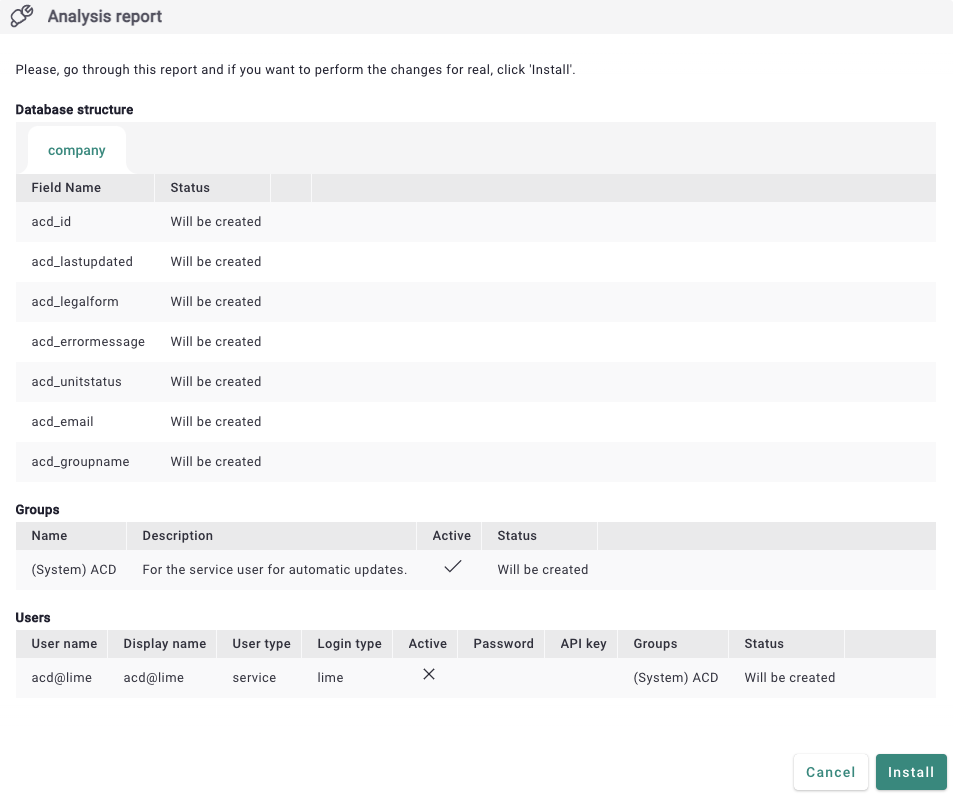
Clicking on the "Check installation" button starts an installation task with an analysis flag. Once it succeeds, all changes that the installation wants to apply to the database will be shown. Up to this point the changes are just simulated. By confirming that you want to continue, another task starts and applies the changes for real.
The analysis report groups the proposed changes by step and shows, for each item, whether it will be created, updated, or skipped because it is already up to date. Whenever the target already exists, the report shows the current value next to the proposed one — also for config-importer imports that only add new entries, where the proposed side previews the config as it will look after the merge. An import only counts as an update when it would overwrite an existing entry with different content; purely additive imports are shown as new.
Selective install
The user does not have to install everything that the consumer ships. Individual items, or whole steps, can be deselected in the report before confirming. Deselected items are reported as skipped and are not touched during the install.
Only brand-new items are pre-selected after the analysis. An item that already exists in the database is marked has updates and starts deselected, because installing it overwrites the existing configuration. There is no "select all" for a section: every such item has to be checked one by one, and checking it opens a confirmation dialog that warns that the existing values, including any customizations made for this specific solution, will be lost. The item is only selected once the user confirms. The same confirmation appears when the Users & Groups step is checked while any user or group would be updated, since that step is installed as a single unit. The diff view next to the item shows exactly what will change. The installation runs step by step, so a failure in one step does not abort the others, and the report shows which items succeeded and which failed.
Downloading the changes
The proposed changes can be downloaded as a single artifact (a zip) straight from the report, for review or for keeping a record of what was installed. Secrets, such as passwords and API keys, are redacted from the download.
The image below shows the analysis report on an installation.