Installation Instructions
Preparations
- Check that the requirements are met.
Installation
- Add
limepkg-addon-installeras a dependency to your package. -
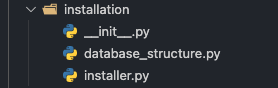
Create a python module (folder) inside your python package, called
installation. The installation module should contain the following:-
An
__init__.pyfile with a function calledget_installation_data. The function should return an InstallationData object. Read more about the InstallationData object here.Warning
The function definition can not be altered!
from lime_application import LimeApplication from limepkg_addon_installer import InstallationData def get_installation_data( app: LimeApplication, config: dict) -> InstallationData: return InstallationData(...) -
An
installer.pyfile with anInstallerclass that inherits fromBaseInstallerspecified inlimepkg_addon_installer:from limepkg_addon_installer import BaseInstaller class Installer(BaseInstaller): def get_module(self) -> str: return <path-to-installation-module> def get_storage_key(self) -> str: return <package_name>
-
-
Extend your
get_schemafunction in your/<package_name>/config/__init__.pyfile with add-on installer'sSetupfield:from <path-to-installer> import Installer def get_schema(self): installer = Installer(self.application) schema = create_schema(self.application) return installer.inject_installer_field(schema)
Installation Data
InstallationData is the object that defines everything that you want to install. Below you can see what is currently supported to install.
-
Database structure - defined by the
database_structurekey in theInstallationDataobject. It should be in the same format as LIP'slip.jsonfile.{ "install": { "tables": [ { ... "fields": [ ... ] } ] } } -
Security - defined by the
securitykey in theInstallationDataobject. It is only possible to install users and groups. The security dict should have the following format:{ "users": [ # Import UserItem from limepkg_addon_installer UserItem( # Import LimeUser from lime_authentication.users lime_user=LimeUser(...), # group names (str) this user should be a member of. The group(s) # must already exist or be included in the groups section below. group_names=[], # True if the password should be stored or shared with someone. # Don't set this if UserType is API as it will be automatically shared! display_password=False ) ], "groups": [ # Import GroupItem from limepkg_addon_installer GroupItem( # Import Group from lime_authentication.users lime_group=Group(...) ) ] } -
View configuration - defined by the
viewskey in theInstallationDataobject. The views list should have the following format:[ { "id": "webclient_views...", "version": ... "config": {} } ]Warning
It is only possible to install views for new tables, you can not modify existing view configuration!
Warning
The view configuration needs to be compatible with the minimum lime-crm of your package, since downgrades are not supported!
-
Settings configs - defined by the
settings_configskey in theInstallationDataobject. These are stored through the owning package's lime-admin config plugin. Each item is identified by anid, which must be the owning package's module name — the same name itsRuntimeConfigplugin registers under:[ { "id": "limepkg_my_package", # required, the owning package's module name "name": "My settings config", # optional, shown in the UI "version": 1, # optional, source version for migration "config": {} # the config payload to import } ]The plugin is resolved by importing the package named by
idand calling itsregister_config()hook, so the package must expose that hook (packages scaffolded withlime-projectdo). Existing configs are updated; the analysis flags unchanged ones as already up to date. Before it is stored, each config is migrated to the plugin's latest version via lime-config-importer's migration walk. If the package is not installed, or it exposes noregister_config()hook, the item fails with a dependency-missing error. -
Config-importer configs - defined by the
config_importer_configskey in theInstallationDataobject. This is a list of batches (lists) of config-importer configs. Each config is identified by akey:[ [ { "key": "my_config", # required, unique key "name": "My config", # optional, shown in the UI "config_data": { # the config-importer ConfigData "key": "my_config", "version": 2, "data": [] } } ] ] -
Automations - defined by the
automationskey in theInstallationDataobject. Each item is an automation in lime-automations DSL format, identified by anid:[ { "id": "my_automation", # required, stable id the installer tracks across installs "title": "My automation", "trigger": {} # ... remaining automation DSL fields } ]An automation the installer created before is matched through a stored mapping from its
id; otherwise (first install, or automations created by hand) it is matched bytitle. Matches are updated, new ones are created. -
Sequences - defined by the
sequenceskey in theInstallationDataobject. Each item describes a sequence:[ { "name": "my_sequence", # required, unique sequence name "title": "My sequence", # optional, shown in the UI "start_value": 1, # required "increment": 1 # required } ]Warning
Sequences are add-only. An existing sequence with the same name is left unchanged, it will never be updated or reset.
-
Manual steps - defined by the
manual_stepskey in theInstallationDataobject. A markdown string describing the steps a user has to perform by hand after the automatic installation. It is surfaced in the installation report so the user does not miss it.manual_steps = ( "## After installing\n\n" "1. Enter your API key under **Settings -> Integrations**.\n" "2. Restart the service.\n" )
Complete example
A complete installation module for a package called limepkg_acme could look
like this. It installs a table, a security group whose name is taken from the
installer config, a sequence, and a manual step.
limepkg_acme/installation/__init__.py:
from lime_application import LimeApplication
from lime_authentication.users import Group
from limepkg_addon_installer import GroupItem, InstallationData


def get_installation_data(
        app: LimeApplication, config: dict) -> InstallationData:
    return InstallationData(
        database_structure=_get_database_structure(),
        security=_get_security(config),
        sequences=[
            {
                "name": "acme_order_number",
                "title": "Acme order number",
                "start_value": 1000,
                "increment": 1,
            }
        ],
        manual_steps=(
            "## After installing\n\n"
            "1. Enter your Acme API key under **Settings -> Integrations**.\n"
        ),
    )


def _get_database_structure() -> dict:
    return {
        "install": {
            "tables": [
                {
                    "name": "acme_order",
                    "attributes": {},
                    "localname_singular": {"en": "Order"},
                    "localname_plural": {"en": "Orders"},
                    "fields": [
                        {
                            "table": "acme_order",
                            "name": "reference",
                            "localname": {"en": "Reference"},
                            "attributes": {"fieldtype": "string"},
                        }
                    ],
                }
            ]
        }
    }


def _get_security(config: dict) -> dict:
    group_name = config.get("group_name", "Acme users")
    return {
        "groups": [
            GroupItem(lime_group=Group(name=group_name, description="Acme users"))
        ],
        "users": [],
    }
limepkg_acme/installation/installer.py:
from limepkg_addon_installer import BaseInstaller


class Installer(BaseInstaller):
    def get_module(self) -> str:
        return "limepkg_acme.installation"

    def get_storage_key(self) -> str:
        return "limepkg_acme"
limepkg_acme/config/__init__.py (inject the Setup field into your schema):
from limepkg_acme.installation.installer import Installer


def get_schema(self):
    installer = Installer(self.application)
    schema = create_schema(self.application)

    return installer.inject_installer_field(schema)
Installer Config
To be able to utilize the installer config feature, an installer config schema has to be created. The schema can either be based on your regular Lime Admin config schema or it can be built customly from scratch. The installer config schema is just a standard marshmallow schema.
-
Base installer config on the regular Lime Admin config schema:
In most cases, the installer config schema should be a subset of your regular Lime Admin config schema. You can therefore explicitly include fields from your Lime Admin config schema to your installer config schema. This way, the amount of duplicated code will be reduced.
If you want a field from your Lime Admin config schema to be included in your installer config schema, you need to add
installer_config=Trueas an argument to that field.field = fields.Str( title='foo', installer_config=True ) -
Build custom installer config schema from scratch:
Building a custom marshmallow schema from scratch gives you more flexibility in terms of what you want to include in your schema.
Your custom installer config schema can be passed as an argument to the installer's
inject_installer_fieldfunction in yourget_schemafunction in your/<package_name>/config/__init__.pyfile.
Validate what the config points at
The setup form is prefilled with the config from the last installation, so
the config your get_installation_data receives may have been entered a
long time ago rather than typed just now. Fields that reference something in the CRM — a
LimeTypeField in particular — can therefore name a limetype or property
that has since been renamed or removed.
Some of that is caught before the form is prefilled: the stored config is
validated against your current schema, and a value that no longer
deserializes is left out of the prefill rather than seeded, with the setup
page saying which. What is not caught is a referent that still
deserializes but no longer means anything — a field serialized without an
enum passes validation and the picker simply renders blank. Validate
these referents in get_installation_data and raise a clear error if they
no longer resolve.
Credentials are not prefilled
Values stored under a credential-shaped key name — password, api_key,
token, client_secret and the like — are deliberately withheld from the
prefill, the same names the artifact download redacts. The
field renders empty and the setup page asks for it to be entered again. If
your installer config carries a secret under a name that does not look like
one, it will be prefilled; consider renaming it, or reading the secret
from the consumer's own encrypted configuration instead of the installer
config.
Checklist
You should have the following at the end of the implementation:
installationmodule inside your python package.installation/__init__.pyfile with aget_installation_datafunction that returns an InstallationData object.installation/installer.pyfile with an implementation of theBaseInstallerinterface.- Add-on installer's
Setupfield should be injected in your Lime Admin config schema. - If installer config: Installer config schema can be built based on your Lime Admin config schema. A custom installer config schema can also be built from scratch and passed as an argument to the installer's
inject_installer_fieldfunction.